How to create/delete replication objects#
Overview#
For users who are new to replication, this document explains how to create and delete replication objects.
- This document is written assuming that the user has completed the preliminary operation for replication structure or configuration.
- The initial data between the replication target servers must match.
For guidance on replication design and configuration, refer to the following technical documents.
Version#
All versions of Altibase
Preparation#
- Dedicated IP for replication
It is recommended to use a dedicated line separate from the service network for the IP to be used for replication. - Replication service port
Decide the service port number to use for replication. It can be arbitrarily set by the user.
Example: 30300 - Select the target table for replication
The table to be replicated must have a primary key.
Enabling the replication function#
Altibase server's replication function is disabled by default, so to use the replication function you must change the relevant property to enable it.
-
If the value of the REPLICATION_PORT_NO property is 0, the replication function is disabled.
iSQL> SELECT NAME, VALUE1 FROM V$PROPERTY WHERE NAME = 'REPLICATION_PORT_NO'; NAME VALUE1 ------------------------------------------------------------------- REPLICATION_PORT_NO 0 1 row selected. -
Enabling the replication function requires restarting the Altibase server.
Procedure for changing the REPLICATION_PORT_NO property#
Replication is enabled by changing the value of the Altibase server property REPLICATION_PORT_NO.
The REPLICATION_PORT_NO property also refers to the port number used between replication threads.
The port number must not already be in use on the server. It is arbitrarily assigned by the user, and 30300 is also commonly used.
The following procedure uses an example of setting the replication port (REPLICATION_PORT_NO) to 30300.
-
Check whether the replication port specified by the user is already in use on the replication target server.
If the LISTEN state is shown, the port is already in use by another process and cannot be used as the replication port.
$ netstat -an | grep 30300 | grep LISTEN -
Open the altibase.properties file, change the REPLICATION_PORT_NO value, and save it.
This must be done on each of the replication target servers.
- How to set REPLICATION_PORT_NO
$ cd $ALTIBASE_HOME/conf $ vi altibase.properties REPLICATION_PORT_NO = 30300 -
Restart the Altibase server process.
$ server restartIf you want to restrict application access during the replication object creation process, change the Altibase server's service port and restart it.
$ export ALTIBASE_PORT_NO=20400 $ server restart -
After starting the Altibase server, check the replication port LISTEN status and the property setting.
- How to check the replication port LISTEN status
$ netstat -an | grep 30300 | grep LISTEN tcp 0 0 0.0.0.0:30300 0.0.0.0:* LISTEN- How to check the REPLICATION_PORT_NO setting
iSQL> SELECT NAME, VALUE1 FROM V$PROPERTY WHERE NAME = 'REPLICATION_PORT_NO';
NAME                            VALUE1
-------------------------------------------------------------------
REPLICATION_PORT_NO             30300
1 row selected.
Creating replication object#
- Replication objects are created with the CREATE REPLICATION statement and define information related to replication such as replication mode, replication server information, and replication target table.
- Two servers to be replicated are paired.
-
Replication objects must each be created with the same object name on the paired replication target servers.
- Syntax for creating a replication object
CREATE REPLICATION replication_name -- Define the name of the replication object. WITH remote_host_ip, remote_replication_port_no -- In the WITH clause, specify the IP and PORT of the remote server to be paired with. FROM user_name.table_name TO user_name.table_name, -- List the tables to be replicated in the FROM ~ TO clause. FROM ... ; -
For more information on the replication object creation syntax, refer to the Replication Creation Manual.
Procedure for creating replication objects - Example 1 (when there are 2 replication target servers)#
This is an example of creating a replication object when the conditions for creating a replication object are as follows.
- The target server for replication is two A and B servers.
- The replication object name is created as REP1.
-
The IP address of the target server A is 192.168.1.112 and the replication port number is 25524, and
the IP address of the target server B is 192.168.1.113 and the replication port number is 35524.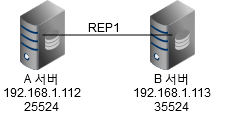
-
The target tables for replication are the SYS user's employees table and departments table.
1. Creating the replication object#
-
Replication object creation syntax on server A (IP 192.168.1.112, replication port 25524)
CREATE REPLICATION rep1 WITH '192.168.1.113', 35524 FROM sys.employees TO sys.employees, FROM sys.departments TO sys.departments; Create success. -
Replication object creation syntax on server B (IP 192.168.1.113, replication port 35524)
CREATE REPLICATION rep1 WITH '192.168.1.112', 25524
FROM sys.employees TO sys.employees,
FROM sys.departments TO sys.departments;
Create success.
2. Checking that the replication object was created#
-
Checking on server A
iSQL> SELECT REPLICATION_NAME, HOST_IP, PORT_NO FROM SYSTEM_.SYS_REPL_HOSTS_; REPLICATION_NAME HOST_IP PORT_NO -------------------------------------------------------------------------------- REP1 192.168.1.113 35524 1 row selected. iSQL> SELECT REPLICATION_NAME, LOCAL_USER_NAME, LOCAL_TABLE_NAME FROM SYSTEM_.SYS_REPL_ITEMS_; REPLICATION_NAME LOCAL_USER_NAME LOCAL_TABLE_NAME ---------------------------------------------------------------------------------------------------- REP1 SYS EMPLOYEES REP1 SYS DEPARTMENTS 2 rows selected. -
Checking on server B
iSQL> SELECT REPLICATION_NAME, HOST_IP, PORT_NO FROM SYSTEM_.SYS_REPL_HOSTS_;
REPLICATION_NAME                HOST_IP                         PORT_NO
--------------------------------------------------------------------------------
REP1                            192.168.1.112                   35524
1 row selected.

iSQL> SELECT REPLICATION_NAME, LOCAL_USER_NAME, LOCAL_TABLE_NAME FROM SYSTEM_.SYS_REPL_ITEMS_;
REPLICATION_NAME                LOCAL_USER_NAME                 LOCAL_TABLE_NAME
----------------------------------------------------------------------------------------------------
REP1                            SYS                             EMPLOYEES
REP1                            SYS                             DEPARTMENTS
2 rows selected.
Procedure for creating replication objects - Example 2 (when there are 3 replication target servers)#
This is an example of creating a replication object when the conditions for creating a replication object are as follows.
-
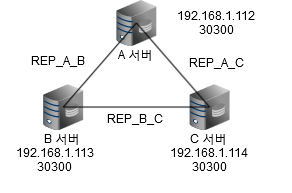
The target servers for replication are three servers, A, B, and C,
where A synchronizes with B and C,
B synchronizes with A and C,
and C synchronizes with A and B. -
The name of the replication object is determined as follows.
- REP_A_B for servers A and B
- REP_B_C for servers B and C
- REP_C_A for servers C and A
-
The IP address and replication port number of each server are as follows.
- Server A: 192.168.1.112, 30300
- Server B: 192.168.1.113, 30300
- Server C: 192.168.1.114, 30300
-
The target tables for replication are the SYS user's employees table and departments table.
1. Creating the replication object#
-
Replication object creation syntax on server A (IP 192.168.1.112, replication port 30300)
CREATE REPLICATION rep_a_b WITH '192.168.1.113', 30300 FROM sys.employees TO sys.employees, FROM sys.departments TO sys.departments; CREATE REPLICATION rep_c_a WITH '192.168.1.114', 30300 FROM sys.employees TO sys.employees, FROM sys.departments TO sys.departments; -
Replication object creation syntax on server B (IP 192.168.1.113, replication port 30300)
CREATE REPLICATION rep_a_b WITH '192.168.1.112', 30300 FROM sys.employees TO sys.employees, FROM sys.departments TO sys.departments; CREATE REPLICATION rep_b_c WITH '192.168.1.114', 30300 FROM sys.employees TO sys.employees, FROM sys.departments TO sys.departments; -
Replication object creation syntax on server C (IP 192.168.1.114, replication port 30300)
CREATE REPLICATION rep_c_a WITH '192.168.1.112', 30300 FROM sys.employees TO sys.employees, FROM sys.departments TO sys.departments;
CREATE REPLICATION rep_b_c WITH '192.168.1.113', 30300 FROM sys.employees TO sys.employees, FROM sys.departments TO sys.departments;
2. Checking that the replication object was created#
-
Checking on server A
iSQL> SELECT REPLICATION_NAME, HOST_IP, PORT_NO FROM SYSTEM_.SYS_REPL_HOSTS_; REPLICATION_NAME HOST_IP PORT_NO -------------------------------------------------------------------------------- REP_A_B 192.168.1.113 30300 REP_C_A 192.168.1.114 30300 2 rows selected. iSQL> SELECT REPLICATION_NAME, LOCAL_USER_NAME, LOCAL_TABLE_NAME FROM SYSTEM_.SYS_REPL_ITEMS_; REPLICATION_NAME LOCAL_USER_NAME LOCAL_TABLE_NAME ---------------------------------------------------------------------------------------------------- REP_A_B SYS EMPLOYEES REP_A_B SYS DEPARTMENTS REP_C_A SYS EMPLOYEES REP_C_A SYS DEPARTMENTS 4 rows selected. -
Checking on server B
iSQL> SELECT REPLICATION_NAME, HOST_IP, PORT_NO FROM SYSTEM_.SYS_REPL_HOSTS_; REPLICATION_NAME HOST_IP PORT_NO -------------------------------------------------------------------------------- REP_A_B 192.168.1.112 30300 REP_B_C 192.168.1.114 30300 2 rows selected. iSQL> SELECT REPLICATION_NAME, LOCAL_USER_NAME, LOCAL_TABLE_NAME FROM SYSTEM_.SYS_REPL_ITEMS_; REPLICATION_NAME LOCAL_USER_NAME LOCAL_TABLE_NAME ---------------------------------------------------------------------------------------------------- REP_A_B SYS EMPLOYEES REP_A_B SYS DEPARTMENTS REP_B_C SYS EMPLOYEES REP_B_C SYS DEPARTMENTS 4 rows selected. -
Checking on server C
iSQL> SELECT REPLICATION_NAME, HOST_IP, PORT_NO FROM SYSTEM_.SYS_REPL_HOSTS_;
REPLICATION_NAME                HOST_IP                         PORT_NO
--------------------------------------------------------------------------------
REP_B_C                         192.168.1.113                   30300
REP_C_A                         192.168.1.112                   30300
2 rows selected.

iSQL> SELECT REPLICATION_NAME, LOCAL_USER_NAME, LOCAL_TABLE_NAME FROM SYSTEM_.SYS_REPL_ITEMS_;
REPLICATION_NAME                LOCAL_USER_NAME                 LOCAL_TABLE_NAME
----------------------------------------------------------------------------------------------------
REP_B_C                         SYS                             EMPLOYEES
REP_B_C                         SYS                             DEPARTMENTS
REP_C_A                         SYS                             EMPLOYEES
REP_C_A                         SYS                             DEPARTMENTS
4 rows selected.
Starting replication#
Starting replication means starting the data synchronization.
The server that starts replication runs the replication sender thread (Sender), and the remote server paired with it runs the replication receiver thread (Receiver).
-
Selecting the replication start server (active server)
The server that starts replication, i.e., the server that runs the replication sender thread (Sender), refers to the server where the change transaction occurs, and is also called the active server.
Among the paired replication target servers, the one where data changes occur is the active server, and the other server becomes the standby server.
If change transactions occur on both servers and synchronize in both directions, both servers become active servers.
-
Starting replication
Replication is started on the active server with the ALTER REPLICATION statement.
replication_name is the name of the object created in the Creating replication object step.
- Replication start syntax
iSQL> ALTER REPLICATION replication_name START;The server that executes the above command runs the replication sender thread (Sender), and the remote server paired with it runs the receiver thread (Receiver).
-
Checking the replication start status
This is a statement to check whether the replication sender thread (Sender) and receiver thread (Receiver) are running.
- How to check the running status of the replication sender thread (Sender) on the replication start server (active server)
iSQL> SELECT REPLICATION_NAME, DECODE(IS_STARTED, 0, 'STOPPED', 1, 'STARTED') IS_STARTED FROM SYSTEM_.SYS_REPLICATIONS_; REPLICATION_NAME IS_STARTED ------------------------------------------------------------------- REP STARTED 1 row selected. iSQL> SELECT REP_NAME, DECODE(STATUS, 0, 'STOP', 1, 'START', STATUS) STATUS FROM V$REPSENDER; REP_NAME STATUS ------------------------------------------------------------------- REP START 1 row selected.- How to check the running status of the replication receiver thread (Receiver)
iSQL> select REP_NAME, MY_IP, MY_PORT FROM V$REPRECEIVER;
REP_NAME              MY_IP                 MY_PORT
------------------------------------------------------------
REP                   192.168.1.113         30300
1 row selected.
Stopping replication and deleting the object#
You can delete the object after stopping replication.
- Stopping replication
iSQL> ALTER REPLICATION replication_name STOP;
- Deleting the replication object
iSQL> DROP REPLICATION replication_name ;
Error messages#
Here are some of the error messages that may occur during the process of creating replication objects.
[ERR-61023 : Replication is disabled]#
- This is an error message that can be encountered when executing the CREATE REPLICATION statement. It occurs when the replication function is disabled
- Check the value of the REPLICATION_PORT_NO property. Refer to the Enabling the replication function section.
[ERR-61113 : A replicated table must have a primary key. (user_name.table_name)]#
- This is an error message that may occur when executing the CREATE REPLICATION statement.
- This occurs when there is no primary key in the replication target table specified in the FROM clause.
- At the end of the error message, a primary key needs to be created in the table inside () and perform a duplicate object creation statement.
[ERR-6100D : [Sender] Failed to handshake with the peer server (Handshake Process Error)]#
- This is an error message that may occur when ALTER REPLICATION replication_name START is executed.
- Check if the remote server's IP and redundancy port number entered in the WITH clause are correct, and that access to the corresponding IP and port is possible.